

| Contents | |
|---|---|
 FES Fractal File Transformation FES Fractal File Transformation |
The Fractal File Transformation form features |
| Transformation Options |
Integrated Transformation Options |
| FES DLL API |
The API calls demonstrated |
Fractal File Transformation
Open the Fractal File Transformation form from the Services menu or F7.
The Fractal File Transformation form transforms (encrypts) a file and extracts (decrypts) a fractal encrypted file:
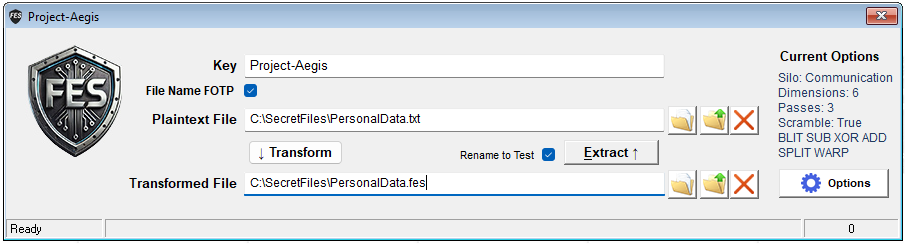
You can open multiple Fractal File Transformation forms. This is useful for comparing cypher outputs for different keys and options.
The file selectors have 3 buttons:
 Select File: Open a windows file selector dialog.
 Browse Folder: Open Windows Explorer for general file browsing.
 Clear: Clear the file path.
The transformation options are shown on the right. See the next chapter for important details!
Transformation Options
The transformation and extraction are always performed with the current options set in the Transformation Options:
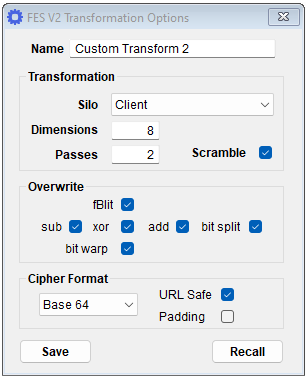
Transformation Option Display
The FES Fractal File Transformation form displays the options according to:
- Current Options: No cipher has been generated.
- Transform Options: The options used in the last Transformation.
- Extract Options: The options used in the last Extraction.
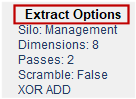
If you change any option, this is reflected on the Transformation Option Display:
- Immediately: When no cipher has been generated.
- Next Transform: When you perform a Transformation.
- Next Extraction: When you perform an Extraction.
If you open several Fractal File Transformation forms you can encrypt the same file with the same key and compare encrypted .fes files with different options.
FES DLL API
The FES API interfaces used are:
- Transform Byte Array: FES.byteFractalTransform.
- Extract Byte Array: FES.byteFractalExtract.