
| Contents | |
|---|---|
 FES Silo Manager FES Silo Manager |
Manage FES Silos |
| Custom Silos |
Generate your own Custom Silos |
| Silo Storage |
Access your Silos |
| Secured Silos |
For commercial licensees |
| FES DLL API |
The API call demonstrated |
FES Silo Manager
Open the Silo Manager form from the Silos menu or Cntrl S.
The FES Silos form manages your Silos:
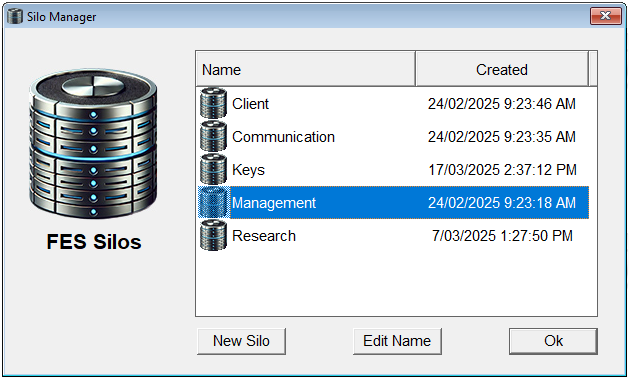
You can generate new custom Silos and edit the name of existing Silos.
Each Silo is the equivalent of a unique encryption algorithm in that any cipher transformed with one Silo cannot be extracted by any other Silo, however, all FES ciphers are impenetrable and quantum proof irrespective of the Silo used.
Custom Silos
There are four Silos installed by default:
- Client: For securing client data.
- Communication: Secure emails and correspondence.
- Management: Secure Management documentation.
- Research: Secure IP documentation and communication.
This is a sample Silo Set that is ready to use and test. However, these Silos are distributed with all FES Framework downloads, so they are a global set.
In a production environment you would generate your own Custom Silos and use them within your organisation and use the installed Silo's for common secure data exchange.
You can also generate Custom Silos to share with partners and associates to secure your communications.
Use the New Silo button to generate desired Custom Silos.
Silo Storage
Silo XML Files are stored in a silo folder located adjacent to the Portalz_FES.dll location (your installation folder).
The Silos Menu has an Open Silos Folder option (Cntrl O) that will take you directly to that folder.
FES Framework manages Silos in that location. You can copy your Custom Silos from this location to share with your teams and associates as required.
Secured Silos
Non-commercial licensees can only generate Non-secured Silos as XML files.
Commercial licensees can generate Secured Silos that are transformed using a Parent Silo and a password key. Secured Silos are stored with the .silo extension.
Secured Silos enable engineering of Silo Hierarchies to match organisational structures and need-to-know compartments.
FES DLL API
The FES API interface used:
- Set Silo Name: FES.strSiloName = "Management".