

| Contents | |
|---|---|
 FES Framework Environment FES Framework Environment |
OS and bitwise requirements |
| FES Framework Purpose |
Important developer notes |
| FES Framework MDI |
The FES Multiple Document Interface |
| Menu Overview |
FES Framework Workbench |
FES Framework Environment
FES Framework is launched as a Windows component in four editions with corresponding licenses:
- Trial - Windows 32 bit (free, non-commercial)
- Personal - Windows 32/64 bit
- Corporate - Windows 32/64 bit
- Defence - Windows 32/64 bit
The 32 bit editions function identically to the 64 bit editions.
All versions are implemented as COM+ ActiveX DLL components and are visible in the Windows COM+ Registry.
Version Status and Compatibility
FES Framework is in beta during the launch phase. When the Alpha version is published, licensees can upgrade.
The current version is deemed robust and production ready. Users should verify suitability with their own testing.
Backward compatibility is maintained to FES V2.1, the current base version. No base version change is expected unless a core issue dictates it.
If required, a baseVersion parameter will be introduced to govern compatibility behavior.
Backward compatibility will always be preserved, and all future compatibility changes will be explicitly controlled by a baseVersion flag.
FES is maintained as a standard, ensuring that updates do not break existing systems, wherever and however implemented.
FES Framework Purpose
The FES Framework executable program (FES_Framework.exe) is not required to access or use the FES_V2.dll.
FES_Framework.exe is a workbench application that hosts FES_V2.dll and exposes its services and API.
It exists to demonstrate usage, facilitate configuration and feature selection of the FES encryption engine.
Context Sensitive Help
Context sensitive help is available throughout the framework using the F1 key.
Each help page explains the purpose of the current form and the configuration options shown.
Online help pages include links to the FES_V2.dll API services demonstrated by that form.
MDI Environment
The Multiple Document Interface (MDI) allows multiple FES configurations to be opened simultaneously.
This enables side-by-side experimentation with different keys, silos, dimensions, and passes.
The MDI environment allows you to test and prove exclusive security domains using different configurations side-by-side.
FES Framework MDI
When you run FES-Framework.exe the FES Framework MDI (Multiple Document Interface) opens:
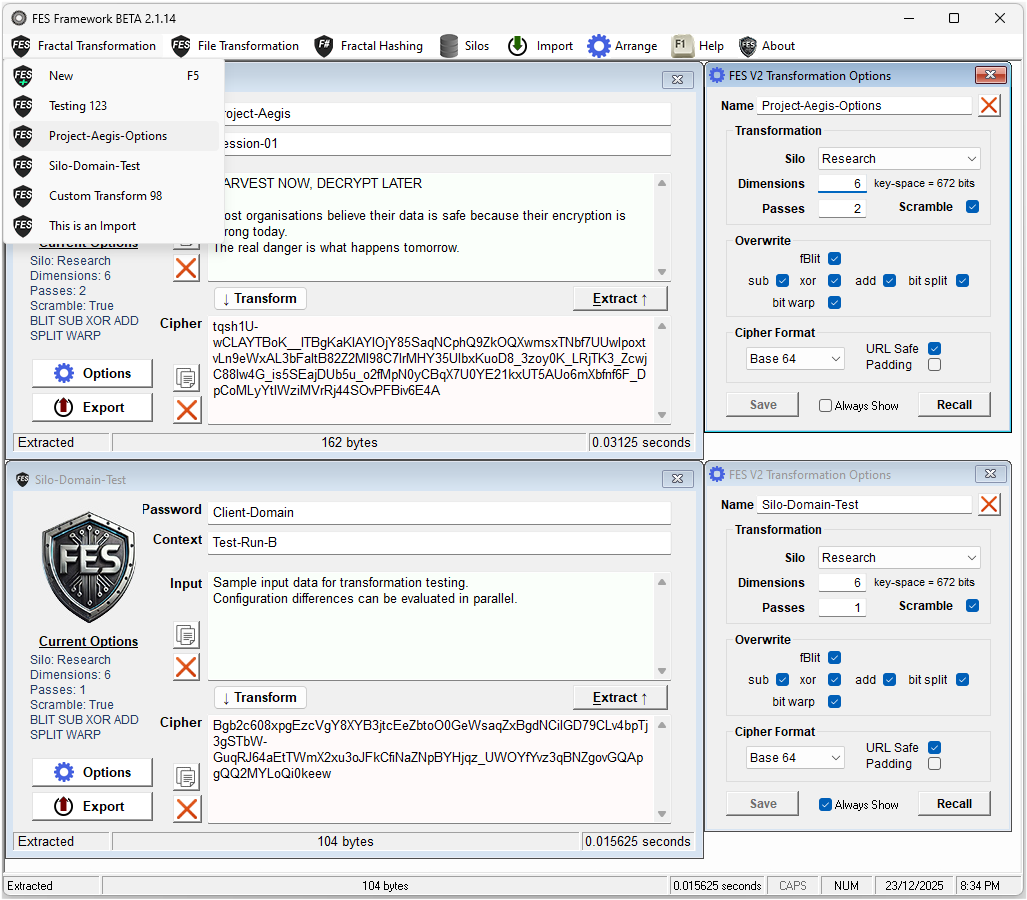
This is an example screenshot showing two FES Transform forms with their respective Options Dialog.
Menu Overview
- Create & manage Fractal Transformations
- Create & manage Fractal Hashes
- Create & manage Silos
 - Arrange Windows (cascade and tile)
 - Import FES-XML
 - FES Framework Help
 - About FES Framework (version and license)